RAW or full-size JPEG
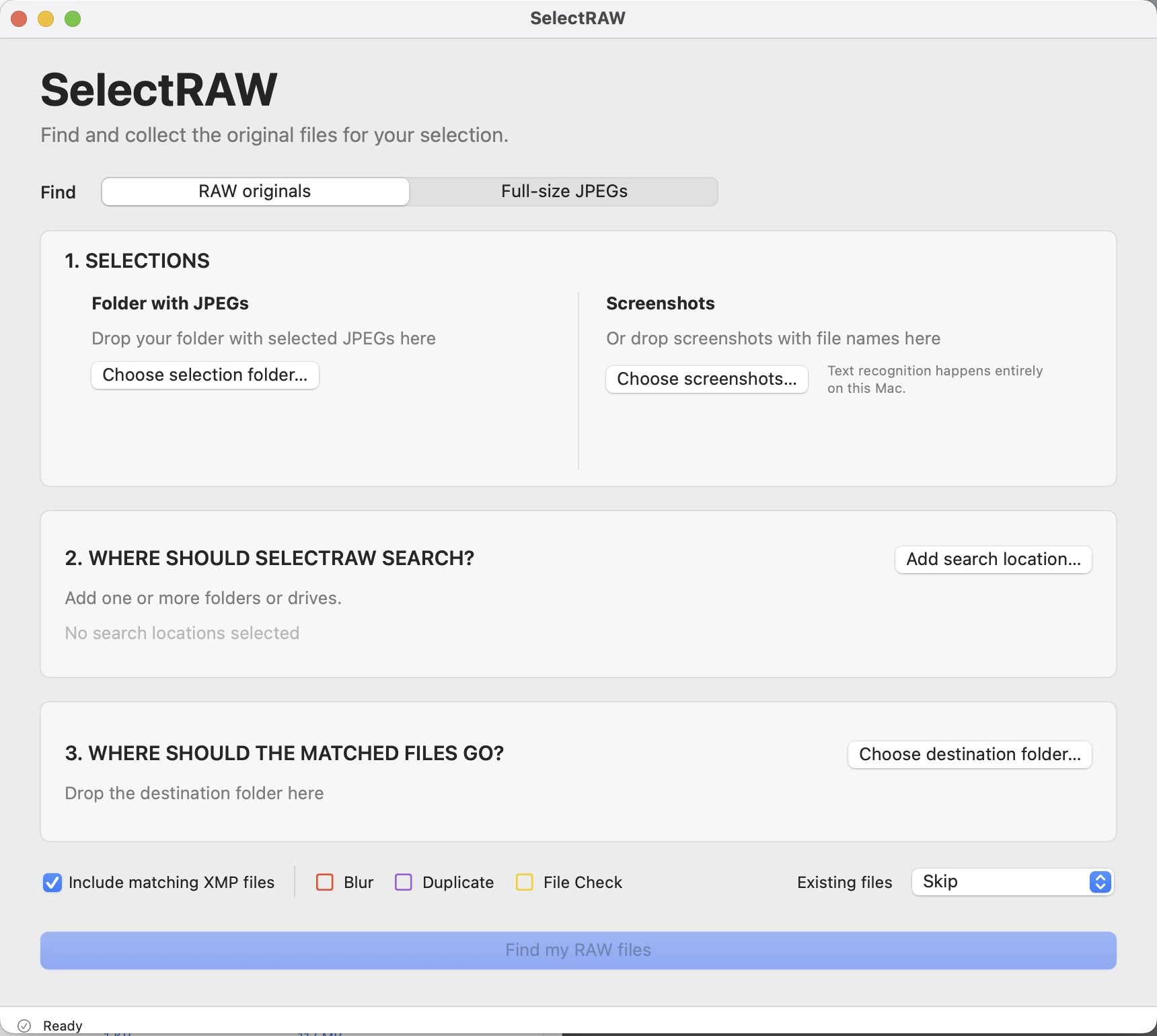
Find RAW originals, or collect the matching JPEGs from your high-resolution archive. You choose the file type and source.
Drop in selected JPEGs or screenshots with filenames. SelectRAW searches the folders and drives you choose and collects the matching RAW files or full-size JPEGs.
One-time purchase · No subscription · Compare purchase options
macOS 14 or later · Apple silicon & Intel · Windows coming soon
The job between selection and editing
Your client has chosen the photographs. You shouldn’t have to hunt through every shoot folder to collect their originals.
Choose a folder of selected JPEGs, or add screenshots showing the filenames.
Select RAW originals or full-size JPEGs. Add folders, drives or external SSDs. Subfolders are searched automatically.
Review found, missing and ambiguous results, choose a destination, and copy the right files.
No conversion. No editing. SelectRAW finds the original files that already exist. It does not create RAW files from JPEGs.
JPEG folder or a batch of screenshots
Drop in the screenshots you received. SelectRAW reads the visible filenames locally and lets you review the list before it searches.
Clear names without a visible extension are supported too. It’s the same search for originals—not a different workflow.
Example filenames only. The original files must already exist in your chosen search locations.
Small on purpose
No new catalogue. No editing suite. Just the tools you need to find and collect a selection.
Find RAW originals, or collect the matching JPEGs from your high-resolution archive. You choose the file type and source.
Choose one parent folder or several drives. Accessible subfolders are included, so you don’t have to add each shoot separately.
Matching uses the base filename. When more than one original matches, SelectRAW asks you to choose.
Missing a source location? Add it and rerun the search without losing your selection, destination or options.
Originals stay untouched. Destination conflicts are never silently overwritten. Review what will be collected before copying.
Optionally include matching XMP sidecars in RAW mode. See what was found, skipped, flagged or copied, and export a CSV report.
Also finds JPG and JPEG originals. Matching and copying are based on filenames. RAW preview availability and optional image analysis depend on the camera format and macOS support; recognising an extension does not guarantee a decodable preview.
Optional. Off by default.
Switch on only the checks you need. Flags help you review copied files; they never automatically reject or delete a photograph.
Conservatively flags photographs that may be unsharp. RAW analysis uses an available preview; files without a usable preview are skipped.
Finder tag: Possible UnsharpDetects exact byte-for-byte duplicate files using SHA-256. Similar-looking photographs are not treated as duplicates.
Finder tag: DuplicateVerifies copy integrity and checks supported files for readability problems. A checksum mismatch is a copy failure, not a successful copy.
Finder tag: File CheckFlags, not guarantees. A preview cannot confirm full-resolution focus or detect every damaged file. Unsupported RAW previews are not labelled corrupt. SelectRAW adds named Finder tags to flagged destination files and preserves existing tags. Red, purple and yellow identify the controls in the app; Finder tag colours follow your Finder settings.
Local photo processing
Screenshot recognition, searching, matching and optional quality checks run locally. SelectRAW does not upload your photographs or screenshots.
The direct-download version contacts Lemon Squeezy for licence activation and validation—not to send photos, filenames or project paths. The Mac App Store version does not require a separate SelectRAW account or licence key.
Read the privacy policy →Get SelectRAW for Mac
Choose how you buy and install SelectRAW.
Both Mac routes are available. Their licences are separate.
The direct download uses a lifetime licence key that can be active on up to 2 computers at the same time.
Buy direct for Mac · €14.99Secure checkout, licence key and order downloads via Lemon Squeezy. Mac download available now.
Apple’s purchase and usage terms apply. The direct-download two-computer activation limit does not apply to this version.
Download on the Mac App StoreApple’s local currency prices may differ by country. See the current price in your storefront.
macOS 14 or later · Apple silicon & Intel. An App Store purchase does not include a Lemon Squeezy licence key. Purchase information & terms.
Download the Mac app and activate it with your existing key. This is not a free trial.
Windows · Coming soon
Leave your email for the Windows availability notification. There is no Windows download or purchase available yet.
No. SelectRAW does not convert or edit photographs. It uses the filenames in your selection to find the corresponding originals that already exist in the folders and drives you choose.
Choose a folder of selected JPG/JPEG files, or drop in a batch of PNG, JPG, JPEG or HEIC screenshots showing filenames. You can review, edit or remove recognised screenshot names before searching. Clear, complete filenames work best; OCR is not infallible.
No. SelectRAW also recognises clear filename-like names without a visible extension, using a conservative combination of letters and numbers. Review the recognised names before searching. It does not guess missing letters or substitute similar-looking characters.
Yes. Choose a parent folder and SelectRAW searches its accessible subfolders. Add several folders or drives when needed. You can add or remove search locations and search again without starting the selection from scratch.
Choose Full-size JPEGs and select the source folders containing your originals. SelectRAW matches the base filename, not the image appearance or file size. The selection folder is excluded from the JPEG search. When several candidates match, you choose the correct one.
SelectRAW shows the possible matches for you to review and choose. It does not silently guess which original is correct. Matching is exact, with no fuzzy changes to the base filename.
No. Matches are copied to a destination you choose. Source originals are not moved, renamed or deleted, and existing destination files are never silently overwritten. Optional quality tags are applied to destination files, not to your originals.
No. It analyses a preview when one can be read. A small preview cannot prove full-resolution focus or know whether blur was intentional. Files without a usable preview are skipped. Possible Unsharp is a prompt for your own review, not a guarantee or an automatic rejection.
The Mac App Store purchase is managed by Apple and needs no separate SelectRAW licence key. Buying direct gives you a Lemon Squeezy lifetime licence key, with up to two active computers in total. These are separate purchases; an App Store purchase does not include a direct-download key.
Yes. Deactivate the old Mac in SelectRAW before activating the replacement. The limit is two active computers at the same time, not two installations for the lifetime of your licence. If the old device is unavailable, contact info@monsieursmade.com for help.
The direct-download version requires internet for initial activation and periodic licence validation. After successful activation it can continue working offline; a temporary network failure does not block an activated app. Photo scanning, OCR and quality checks run locally. App Store purchases and installation are handled separately by Apple.
SelectRAW for Mac requires macOS 14 or later and supports both Apple silicon and Intel Macs. Windows is coming soon and is not available to download yet. Join the waitlist below the purchase options for the availability notification.